Intent over guesswork.

Vyvid reads your recovery each morning, then shapes your training and your meals around it. It gets sharper the more you log.

No ads. No data sales. Your data is yours — locked to your account and nobody else's. Read the privacy policy

175Countries
Apple HealthHRV · sleep · resting HR
No adsNo data sales
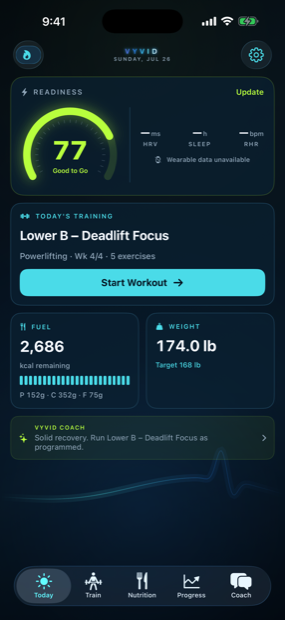
Vyvid's Today screen: a readiness score of 77, the day's programmed session, calories remaining and current weight
Check inRate your sleep, energy and soreness
TrainGet a workout built for today
FuelEat to targets that fit your goal
AdaptNext week learns from this one

Your body sets the plan.

Move the sliders and watch the plan change. This is the same readiness engine the app runs every morning to work out how hard you should push.

74readiness
Normal session

Lower A, squat focus. All 18 sets as written.

How a day goes.

Start with a check-in

Six quick sliders each morning: sleep, energy, soreness, stress, motivation and hydration. They roll up into one readiness score and a plain recommendation for the day, so you know what your body actually has to give before you touch a barbell.

Vyvid Today screen showing readiness score, today's workout and nutrition

Train on a plan that adjusts

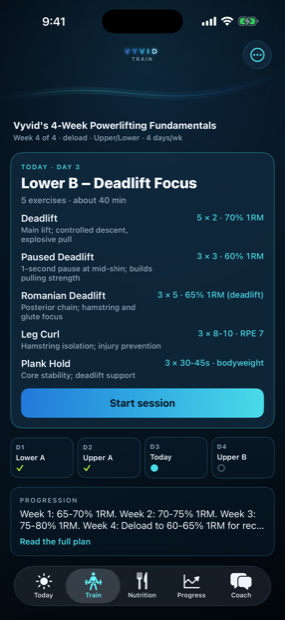
Vyvid builds your program around your goals, equipment and experience, whether that's hypertrophy, powerlifting, calisthenics or conditioning. On rough days the session trims itself. On good days, go get the PR. Auto rest timers in the logger keep you moving between sets.

Vyvid program screen with weekly training schedule

Log meals with your camera

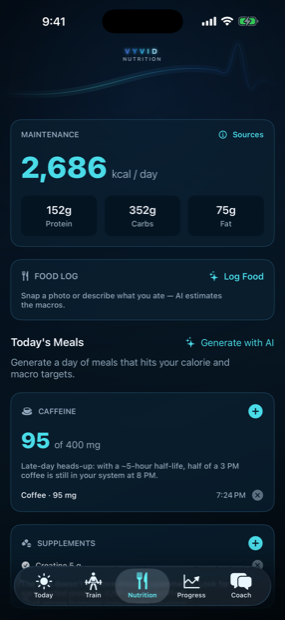
Snap a photo or type what you ate and the macros are logged in seconds. Meal plans stick to your targets while skipping your allergies and the foods you just don't like. What's left for the day counts down as you log.

Vyvid nutrition screen with macro targets and food log

Ask the coach anything

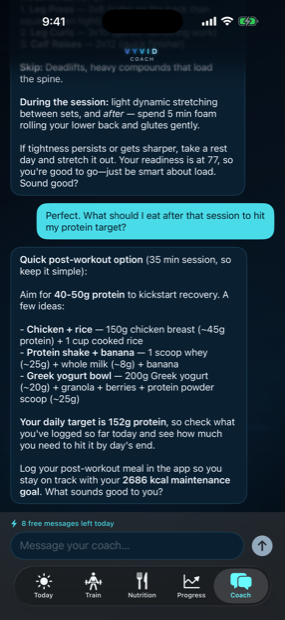
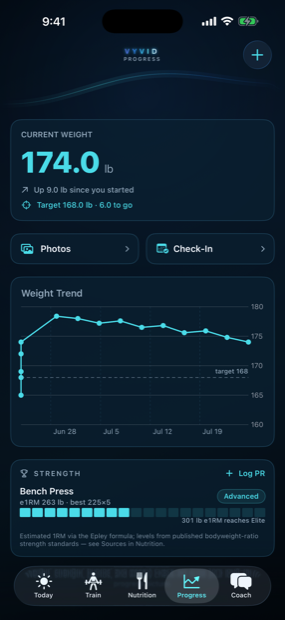
The coach answers with your actual training, nutrition and recovery in front of it, so the advice fits you rather than everyone. Weight trends, progress photos and weekly check-ins round out the picture over time.

Vyvid AI coach chat screen

STRONGER ISN'T RANDOM.

You're already wearing it.

Your watch has been tracking your heart rate variability, resting heart rate and sleep all along. Vyvid reads it through Apple Health and puts it to work in your readiness picture.

Apple Watch Whoop Oura Garmin + anything that syncs to Apple Health
5:42
READINESS
Ready to push
8-week streak
NEXT SESSION
Lower A — squat focus

Watch app on the roadmap

Inside the app.

Vyvid today dashboard
Your morning briefReadiness, session and macros
Vyvid training program
Real programmingPercentages, RPE and deloads
Vyvid nutrition tracking
Macros that count downPhoto logging built in
Vyvid progress tracking
Proof over timeTrends, photos and check-ins

Straight from your home screen.

Vyvid’s widgets put the number that matters where you already look. Your readiness score, the session you’re programmed for, and your current streak — updated through the day.

  • Readiness — today’s score, in its zone colour
  • Today’s session — what you’re training, at a glance
  • Streak — the run you don’t want to break

Tap any widget and Vyvid opens straight to the screen it was showing.

Three Vyvid widgets on an iPhone home screen: today's session, a training streak, and a readiness score of 77

Simple pricing.

The full tracking experience is free. Premium is there when you want the AI doing more of the work. Cancel anytime in the App Store.

Free

$0 forever
  • Daily readiness check-ins and score
  • Full workout logger with rest timers
  • Nutrition targets, food log and grocery lists
  • Weight trends, photos and weekly check-ins
  • A daily allowance of AI messages and plans

Everything here stays free.

PREMIUM

Vyvid Pro

$9.99 / month

or $69.99 / year

  • Everything in Free
  • Rebuild your AI program as often as you want
  • AI meal plans and photo food logging, all day
  • Full-volume coach conversations
  • First access to new features

Auto-renewing subscription. Cancel anytime in your App Store settings.

What about your data?

Vyvid is built for people who want useful coaching without handing over more than they need to.

No ads. No data sales.

Vyvid makes money one way: subscriptions. Your data is never the product, and nothing tracks you across other apps.

Locked to your account

Every record is protected by row-level security in the database itself — readable by you and no one else.

Apple Health stays read-only

With your permission, Vyvid reads recovery metrics like HRV and sleep. It never writes anything back.

Still wondering?

What happens to my health data?

It sits in a database where every table enforces row-level security, which means your rows are readable by you and no one else. There are no ads, no data sales, and no tracking across other apps. The full details are in our privacy policy.

How does the Apple Health integration work?

It's read-only and optional. If you grant access, Vyvid reads metrics like heart rate variability, resting heart rate, sleep and steps to build a fuller recovery picture. It never writes to Apple Health, and the app works fine without it.

What does the AI actually do?

It builds multi-week training programs around your goals, equipment and daily readiness. It generates meal plans and reads macros from photos of your food. And it powers a coach chat that answers using your actual training and nutrition history instead of generic advice.

Do I need a gym?

No. Programs adapt to whatever you have: a full gym, a pair of dumbbells at home, or nothing but bodyweight. Tell Vyvid what's available and it builds around it.

Is it beginner friendly?

Yes. Your experience level shapes the exercises, the volume and how the coach explains things. Advanced lifters get percentage-based programming, and beginners get movements they can learn safely from day one.

How do I cancel?

From your App Store subscription settings, the same as any Apple subscription. The free features keep working either way.
Don't just trust us.

Ask an AI that doesn't work for us. One tap opens your assistant with an honest question already typed — no pitch, no leading the witness.

Ready when you are.

Free to download for iPhone.

Download on theApp Store